Tui
Terminal user interfaces on Turbo Vision, as the Elm architecture (TEA) node apps.
You write
view : Model -> Ui
and hand back a description of what should be on screen. The description is encoded as JSON and sent over a port; the JavaScript runtime on the other side compares it with what is already there and patches the difference. Events come back the same way and arrive as messages.
Nothing here calls into C++ and nothing here blocks, including modal dialogs.
A complete program
port module Main exposing (main)

import Json.Decode as Decode
import Json.Encode as Encode
import Node
import Tui exposing (Event(..), MenuItem(..), View(..))

port tuiOut : Encode.Value -> Cmd msg

port tuiIn : (Decode.Value -> msg) -> Sub msg

tui : Tui.Ports Msg
tui =
    { toJs = tuiOut, fromJs = tuiIn }

type Msg
    = FromTui Event

main : Tui.Program Int Msg
main =
    Tui.defineProgram tui
        { init = \_ -> Node.startProgram { model = 0, command = Cmd.none }
        , update = \_ model -> { model = model + 1, command = Cmd.none }
        , subscriptions = \_ -> Sub.none
        , onEvent = FromTui
        , view =
            \model ->
                { menuBar = []
                , statusLine =
                    [ { text = "~Alt-X~ Exit", key = "Alt-X", cmd = "quit" } ]
                , theme = Tui.borland
                , windows =
                    [ { id = "counter"
                      , title = "Counter"
                      , rect = { x1 = 2, y1 = 2, x2 = 40, y2 = 8 }
                      , resize = Tui.resizable
                      , palette = Tui.BlueWindow
                      , canClose = True
                      , canMove = True
                      , views =
                            [ StaticText
                                { id = "count"
                                , rect = { x1 = 2, y1 = 1, x2 = 30, y2 = 2 }
                                , text = "events: " ++ String.fromInt model
                                }
                            ]
                      }
                    ]
                , overlays = []
                }
        }
Build and run it with:
gren make Main --output=main.js && gren-tui main.js
which is this:
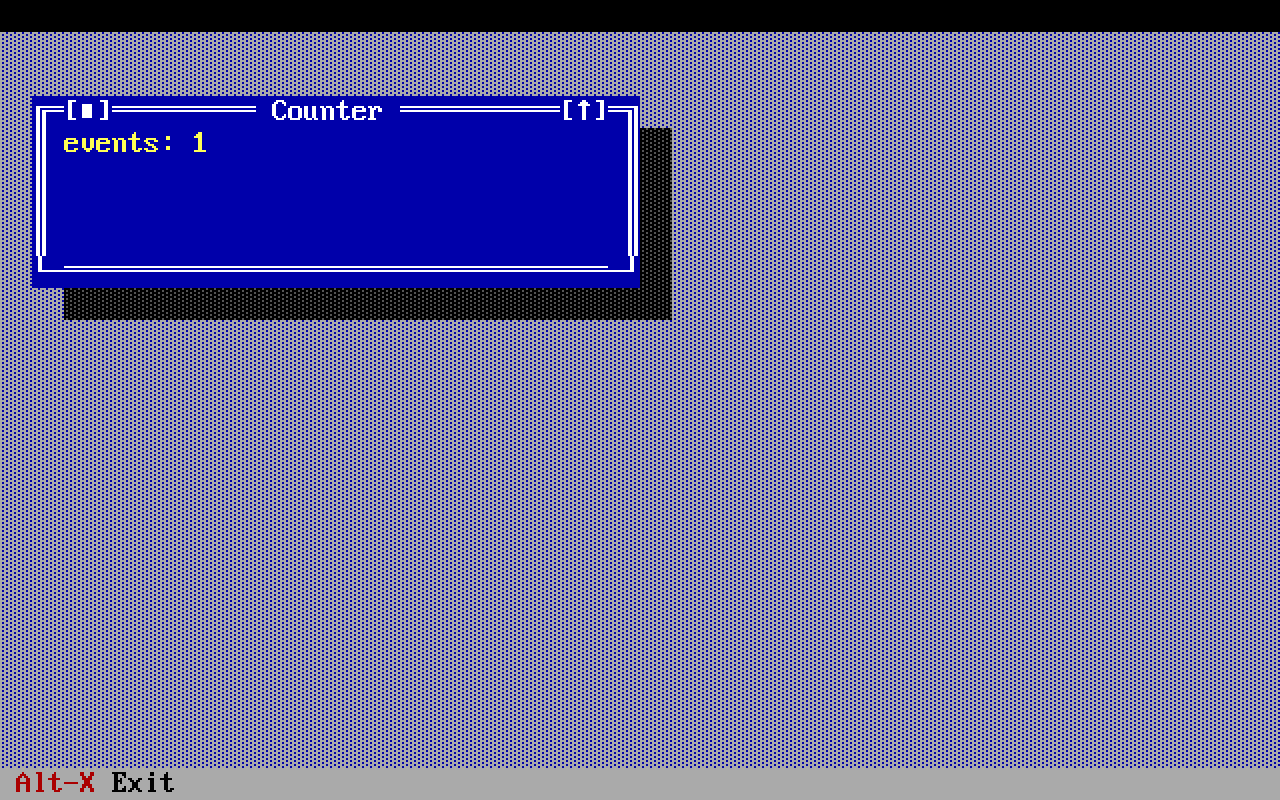
That picture is taken by compiling the program above -- the actual text of it, lifted out of this comment -- and photographing it at a real terminal, so it cannot come to disagree with the code.
Two things in it are worth a sentence, because both are the program being right rather than wrong.
events: 1 before you have touched anything. update counts every message
it is given, and a terminal tells a program how big it is without being asked,
so a Resized has already arrived. Count something narrower and it
starts at nought.
The strip above the window is unpainted, because menuBar = [] means there
is no menu bar -- not an empty one -- and the desktop still begins on the row
below where one would be. Give the program a menu and the strip is the menu
bar.
Where the ports come from
Gren packages may not declare ports -- the compiler refuses, to keep the
package ecosystem free of JavaScript -- so the two ports are declared by your
application and handed over as a Ports record, as above. The names
tuiOut and tuiIn are what the JavaScript runtime looks for.
Ids are the contract
Every window and every view carries an id. Keep it stable across renders:
that is what lets the runtime patch a view in place rather than rebuild it, and
a rebuilt window loses its focus, its scroll position and its place in the
z-order.
Ids also disappear on their own. When a window closes -- including when the
user closes it from its frame -- everything in it is gone, and you find out
through a WindowClosed event. A model that ignores that event will
put the window straight back on the next render.
The menu bar is part of the view too
Turbo Vision builds the menu bar and the status line inside its application
constructor, which makes them look like fixed configuration -- but that is only
where they start. Both live in members that can be swapped while the program
runs, so both are in Ui alongside the windows, and changing one is an
ordinary model change. tvision's own mmenu example exists to demonstrate
exactly that, and examples/mmenu is it, in a dozen lines.
A menu bar is just a list of MenuItems: an entry with entries of
its own is a pull-down, and one without is a command sitting on the bar.
Things Turbo Vision does that will surprise you
-
Enterdoes not press the focused button, or select a list item, or tick a check box.Spacedoes all three.Entermeans "the default action of this dialog", and only a button withisDefault = Trueanswers it. -
Hotkeys are one flat namespace. Inside a dialog the first control that claims
Alt-x gets it. Worse, the status line's keys are global and beat even an open modal dialog, so a status entry bound toAlt-Nmakes every~N~amefield in the program unreachable. -
Window rectangles are desktop coordinates.
y1 = 0is the row under the menu bar, not the top of the screen. Rectangles inside a window are relative to that window, whose frame occupies row and column zero. -
The first click on an inactive window is spent activating it and does not reach the control underneath. The same rule applies one level down: a control that can take focus and does not have it spends the first click taking it, so a
CanvaswithtakesFocus = Truebeside another one needs two clicks to reach. A view that cannot take focus --takesFocus = False-- has no first click to spend, which is one more reason to say so where it is true.A
ScrollBaris the exception, and deliberately: it is reachable by Tab and acts on the first click, because a control whose whole purpose is to be clicked must not behave differently depending on something no screen shows. SeeScrolledfor what a click on one does.
The whole API on one screen
Grouped by what you are trying to do. The reference below is in the same order and says the rest.
Starting a program
Ports |
the two ports your application declares and hands over |
defineProgram |
build the program; Program is what main is annotated with |
ProgramConfiguration |
init, update, subscriptions, view, onEvent |
defineProgramOrExit |
the same, for a program that may decide not to paint at all |
Startup |
Start model or Exit -- what that init answers |
ProgramConfigurationOrExit |
its configuration |
What is on screen
Ui |
the whole screen: menu bar, status line, windows, overlays, theme |
Window |
one window on the desktop: id, title, rectangle, views |
Rect |
a rectangle in character cells |
WindowPalette |
BlueWindow, CyanWindow or GrayWindow |
Resize |
which of a window's dimensions the user may change |
resizable resizeWidth resizeHeight fixedSize |
the four of them |
The views, all constructors of View
StaticText |
a run of text, drawn and nothing else |
Button |
pressed by Space, or by Enter if isDefault; sends a cmd |
InputLine |
one line of editable text, with an optional allowed set |
History |
the drop-down of previous values for an InputLine |
ListBox |
a list, with focused, top, columns, and a chooses command |
CheckBoxes |
a group of check boxes, ticked by Space |
MultiCheckBoxes |
the same with more than two states per box |
RadioButtons |
a group of which one is selected |
ScrollBar |
standalone, or attached to another view by for |
Label |
text that gives its for view a hotkey and a click target |
Canvas |
you paint it: lines of Spans, an optional cursor |
Editor |
a full text editor; its contents do not travel with the render |
Grows |
wraps a view and says which edges follow the window |
Enabled |
wraps a view and grays it out |
Visible |
wraps a view and takes it off the screen |
Views that follow their window, all of them a Grow
fixed |
no edge follows: keep the rectangle. The default |
stretch |
right and bottom follow: grow with the window |
stretchWidth stretchHeight |
one of the two |
pinRight pinBottom |
keep the size, slide with that edge |
Color on a canvas
Span |
a run of characters in one color |
Hue |
the sixteen colors a terminal has had since 1981 |
line |
a whole line in the window's own color -- nearly every line |
plain |
one span in the window's own color |
ink |
one span in a foreground of your choosing |
on |
...and a background too |
Color everywhere else
Theme |
every color this package draws rather than the model |
borland |
Turbo Vision's own scheme, and the value to start from |
ThemePanel |
one surface: a window, the alternate window, a dialog |
Pair |
a foreground and a background |
Tint |
Ansi one of the sixteen, or Rgb if the terminal has it |
Menus and the status line
MenuItem |
Item, SubMenu or Separator -- the menu bar is a list of them |
StatusItem |
one entry on the status line. Its key is global |
popupMenu |
open a context menu at a point in a view |
PopupItem |
Entry or Divider -- what goes in one |
Events, all constructors of Event
Command |
a menu entry, a status entry or a button, by its cmd string |
Selected |
a list entry was committed; Focused, that the caret moved to one |
KeyPressed |
a key nothing else claimed |
Clicked |
with isDouble and isRight; Dragged is what it turned into |
Scrolled |
a scroll bar moved, however it was moved |
Resized |
the terminal changed size; WindowResized, that a window did |
Changed |
a control's value changed, carrying a Value |
Edited |
an Editor's state: caret, selection, undo, modified |
EditorText |
the answer to readEditor; Searched, to a find |
Copied |
a copy happened, and whether it left the program |
ClipboardText |
the answer to readClipboard |
DialogClosed |
a modal dialog was answered, with its values |
WindowClosed |
a window is gone, including when the user closed it |
Unknown |
the runtime said something this version does not know |
Reading what an event carries
Value |
Text, Flags, Choice or Marks -- what Changed carries |
text |
an input line's text, out of a DialogClosed's values |
number |
a number: a list box's focused index, a radio group's choice |
flag flags |
one check box, or a whole group of them |
marks |
a group of multi-state boxes, one state index per box |
Telling the terminal to do something
dialog |
open a modal dialog; DialogSpec is what it takes |
messageBox |
a message box, ready to hand to dialog |
MessageButton |
its buttons: okButtons, okCancelButtons, yesNoButtons, yesNoCancelButtons |
fileDialog |
a file or directory chooser, the same way |
focus |
put the caret on a view |
bringToFront |
put a window in front of the others |
setEnabled |
gray a command out everywhere it appears, or bring it back |
setDoubleClickDelay |
how long two clicks may be apart and still be one |
quit |
quit |
The editor, which is the one view whose contents the model does not hold
setEditorText |
put a document in, replacing what is there |
readEditor |
ask for it back; the answer is an EditorText event |
setEditorCaret |
put the caret on a line and a column |
insertIntoEditor |
type at the caret, replacing the selection |
findInEditor |
find forward from the caret and select the match |
replaceInEditor |
find and replace |
The clipboard
copyToClipboard |
put text on it; a Copied event says whether it left the program |
readClipboard |
ask for its text; the answer is a ClipboardText event |
The application's two ports, handed over once. See the note above on why they cannot live in here.
What defineProgram returns, and the type your main
should be annotated with.
The model the runtime actually carries is a Startup, because a
program built with defineProgramOrExit may decide
there is no program to run -- but that is this module's business, and
Tui.Program Model Msg is what a main says either way.
The same fields as Node.defineProgram, plus:
view-- the description of what should be on screen, rendered once at startup and again after every update.onEvent-- how anEventbecomes one of your messages.
init is a full Init.Task, so subsystems like FileSystem can be awaited
before the first model exists.
Build the program.
The whole view is sent after every update -- the entire description, every
time. Working out what actually changed is the runtime's job, exactly as a
virtual DOM does it, so a view that rebuilds its whole Ui on each call
costs nothing beyond the JSON.
Whether there is a terminal program to run at all.
init returns one of these when the program is built with
defineProgramOrExit. Start is the ordinary answer
and carries the first model. Exit says that the program has nothing to put
on the screen and that the command it was started with -- printing a --help,
reporting a command line that was wrong -- is the whole of what it does.
Exit is not "quit as soon as you have painted". Nothing is painted: no render
message is sent, the runtime never starts Turbo Vision, and the terminal is
never switched out from under whatever the output is being piped into. That is
the difference that makes it worth having, and it is why the decision has to be
made in init rather than answered by a later message.
The same fields as ProgramConfiguration, except
that init answers with a Startup rather than with a model.
Build a program that may decide, before it paints, that it is not a terminal program this time.
An application has a command line, and a command line has answers that are not
a screen: --help, --version, a word that is not a command, a flag that
wanted a value. Those are printed and the process exits, and the one thing that
must not happen in between is Turbo Vision taking the terminal -- which is what
the first render does, and what makes it a decision for init and nothing
later.
init env =
    when Argparse.Parser.run (Array.dropFirst 2 env.args) parser is
        Argparse.Parser.HelpText doc ->
            Node.startProgram
                { model = Tui.Exit
                , command =
                    Stream.Log.line env.stdout (PP.toString doc)
                        |> Task.execute
                }

        Argparse.Parser.Success command ->
            Node.startProgram
                { model = Tui.Start (modelFor command)
                , command = Cmd.none
                }
After Exit the program is inert: no render is sent, view is never called,
update and subscriptions are never reached, and the process ends when the
command it was given has finished -- so set an exit code with
Node.setExitCode, which waits, rather than with Node.exitWithCode, which
does not wait for the write to reach a pipe.
Everything that should be on screen right now: the menu bar across the top,
the status line across the bottom, the windows in between -- and overlays,
which are none of those.
Windows not in this list are closed; windows in it that are not on screen are opened. There is no separate "open a window" command -- put it in the view and it appears.
overlays are views on the application, not on the desktop. Turbo
Vision's TClockView and THeapView are inserted into TProgram rather than
into TDeskTop, and that is not an implementation detail: the desktop is the
patterned area that windows live in, and a clock in the top-right corner is
not in it. A view here is drawn above every window, cannot be covered by one,
never takes part in Tile or Cascade, and is in screen coordinates -- row 0
is the menu bar's row, which is where a clock usually goes.
overlays =
    [ Grows
        { grow = Tui.pinRight
        , view =
            StaticText
                { id = "clock"
                , rect = { x1 = cols - 9, y1 = 0, x2 = cols, y2 = 1 }
                , text = clock model.now
                }
        }
    ]
The Grows wrapper is what keeps it in the corner when the terminal
is resized; TClockView sets the same growMode in its own constructor.
Screen coordinates means the width to lay out against is the screen's, and
what Resized reports is the desktop's -- one row shorter at the
top and one at the bottom, and the same width.
The set is rebuilt whole when its shape changes and patched by id when it does not, exactly as a window's contents are -- which is what lets a clock render once a second without repainting the corner every time. Overlays are for showing things; put anything the user has to reach in a window.
A StaticText here draws in theme.bar, the color of the
menu bar and the status line, because there is no panel behind a view on the
application to take one from and row 0 is the bar's own row. TClockView
draws in that color for the same reason.
A window on the desktop.
id must be stable across renders -- it is how the runtime recognizes this as
the same window. title and rect can change freely: both are patched in
place, the second through TView::locate, which is also what resolves the
Grows of everything inside.
Changing resize, or the id, type or rectangle of anything inside
the window, is a structural change: the window is closed and rebuilt, losing
its z-order. Changing only the content of its views is not.
Two things a rebuilt window does keep. Its place: if the user had dragged it somewhere, that is where it comes back, and only a model that moves it itself moves it. And the caret, if the user had moved it -- the control it was in gets it back, and a field gets back the column the caret was in as well. A window rebuilt before anybody has touched it focuses whatever its new description says, the way it always did.
A control that cannot take the caret when the window is rebuilt -- a field that
has become a StaticText while something is read-only, say -- does
not lose it either: the caret goes back the next time that control can hold
it.
A window's rect is the model's opinion of where the window should be, not a
report of where it is. The user can move and resize one, and the runtime does
not write the model's rectangle back over that -- it compares against what the
model last rendered, so a rectangle that has not changed is a window left
alone. WindowResized is how a model that wants to know finds out.
A window whose rect fills the desktop still un-zooms. Turbo Vision
restores a zoomed window to the rectangle it had before it was zoomed, and a
window built at the full size of the desktop has none -- so its zoom box would
do nothing, while its frame drew [↕] to say that it would. The runtime
notices that and restores to three-quarters of the desktop instead, centered, in
whichever dimensions Resize left free. Nothing has to be said for
this to happen.
canClose and canMove are the other two of Turbo Vision's four window flags;
Resize already speaks for the two that grow and zoom it. False
takes the close box off the frame and pins the window where it is, and both are
redrawn rather than rebuilt, so a window may change its mind without losing the
caret.
A window with no close box is the one to reach for first. A program whose
main window is the program has nothing sensible to do when the user closes
it, and answering a WindowClosed by reopening the window is a flick
on the screen where not drawing the box is silence. True for both is what
every window did before the fields existed.
The controls.
The order of the array they are in is two things, and both are easy to
change by accident. The caret opens on the first view in it that can hold one,
and Tab walks the array from there, so this array is the tab order. Build it
as one literal where you can; a views assembled out of pieces is where the
order goes wrong, and it went wrong here -- Tui.fileDialog listed its buttons
first for a week, because Array.append fst second makes fst the postfix.
-
StaticText-- a run of text. Longer than its rectangle is silently truncated, so budget the columns. -
Button-- sendscmdas aCommandevent when pressed, or closes adialogwith it. Press withSpace;Enteronly reaches a button withisDefault = True.takesFocus = Falsemakes one that can still be pressed -- by mouse, or by its~x~ hotkey -- but never holds the caret, which is what a keypad or a toolbar wants when something else in the window is reading the keyboard. ACanvashas the same field for the same reason.titleis patched in place, so a button that says what pressing it will do --~S~topbecoming~S~tart-- costs its window nothing. The hotkey moves with the caption, because Turbo Vision reads the tildes when the key arrives rather than when the button is built.cmdis not: a button whose command changed is a different button, and gets one. -
InputLine-- a text field.maxLenis how many characters the user may type, and the rectangle needs two columns more than that: one the field spends on itself and one for the caret to sit past the last character. A rectangle any narrower still holds the whole value and shows it scrolled, with a\u{25C4}where the first character was.valueis written to the field only when it changes in the model, so it never overwrites what the user is typing.allowedis the set of characters it will accept, as a string:Just "0123456789"is a field only digits can be typed into, andNothing-- which is almost always what you want -- accepts anything. A rejected keystroke does not happen, so nothing is reported and there is nothing for the model to do about it.It filters typing and only typing. A
valuethe model sets goes in whatever it contains: the model put it there, and validating what the model itself produced is the model's job. Turbo Vision would refuse to close the dialog and put up an error box; this does not, deliberately. -
History-- the\u{25BC}drop-down beside an input line, holding what was typed into it before. It has no rectangle: it occupies the three columns immediately to the right of the field it names, which is where Turbo Vision puts every one of them, so leave three. List the field before its history, as with aLabel. Clicking the arrow -- or pressingDownin the field -- opens a list ofitems; choosing one puts it in the field and arrives as an ordinaryChangedevent on the field, because that is what happened.The list opens as tall as it is, up to the room the dialog leaves below the field. Borland gives one a fixed seven rows (
thistory.cpp:93), which shows six items whatever the list holds; this one is sized fromitems, so a short list is a short window and a long one gets as much of the dialog as there is. It cannot leave the dialog -- that is Borland's clip and it stays -- so a list longer than the room below its field is scrolled rather than shown whole. Leave room under a field whose drop-down should be read at a glance.A single click chooses. Turbo Vision wants a double click or
Enter, which is the convention for a list somebody might be browsing; a drop-down is not being browsed. Both still work.itemsis the model's array and nothing else writes to it. Turbo Vision remembers the field for you, in one buffer shared by the whole program; here nothing is remembered until the model decides to remember it, which is usually oneArray.pushFirstwhen a dialog is answered. That also means the list survives a restart if the model saves it, which Turbo Vision's never did. -
ListBox-- gets a scroll bar of its own, in the single column immediately to the right of its rectangle, so leave one. (Turbo Vision puts it on the window's frame, which is right for a window that is a list and nothing else and wrong for anything with two panes in it.) That bar takes the mouse wheel only while the pointer is over the list or over the bar itself, so several lists side by side each scroll under their own pointer -- which is not how Turbo Vision routes a wheel turn, and is the reason this bar is not the stock one. Moving the highlight sends aFocusedevent; committing an entry (Space, or a double click) sends aSelectedone.focusedis that highlight seen from the other side: it is written to the list only when the model changes it, so it steers without fighting the arrow keys. Writing it sends noFocusedevent back, unless the list had to clamp it -- seeEvent, where the loop that rule exists to break is described.choosesis a command name, and it says that committing an entry is the same act as pressing the button that carries that command -- which inside a modal dialog is how a double click opens the file.""for a list where it is not, which is every list in a window: aSelectedevent is the whole answer there, and the model is free to do what it likes with it. (Set it in a window anyway and the command travels the route a button's does, arriving as an ordinaryCommandevent. There is nothing wrong with that; it is just longer than answering theSelectedyou were already sent.) It is a field rather than something the model does when the event arrives because a modal dialog can only be ended by a command, and by the timeSelectedhas crossed the port the dialog is still open with nothing able to close it. Turbo Vision's ownTFileDialogdoes exactly this translation, in C++, inside the dialog (cmFileDoubleClickedbecomescmOK).columnsdivides the list's rectangle and fills each column downwards, so a two-column list of nine items puts five on the left and four on the right.1is the ordinary list. This is what Turbo Vision's ownTListViewerhas always done and what a list too long for its window often wants instead of a scroll bar.topis which item is drawn on the first row, which is a different sentence fromfocusedand is the only place in this package where a model can put the highlight out of sight. Turbo Vision moves this itself to keep the focused item visible and offers no way to say it, because a list's scroll bar tracksfocusedand not this.0is the top, and the next thing that moves the highlight scrolls it back into view of its own accord. -
CheckBoxes-- a group of boxes, ticked withSpace.checkedis one flag per item, andavailableone more flag per item: a box whose flag isFalseis drawn gray, is skipped by the arrow keys and cannot be ticked, which is how a form says that a choice does not apply right now rather than hiding it and moving everything below it up.[]-- the ordinary case -- says nothing about any box, and an array shorter than the cluster says nothing about the ones past its end.availableandEnabledare different things and both are worth having: this grays one box, andEnabledgrays the whole cluster, because a cluster is one view however many boxes are in it. -
MultiCheckBoxes-- the same cluster with more than two states per box.marksis one character per state, in order, drawn between the brackets:" ?X"is a box that cycles blank,?,X.statesis one index intomarksper item. Space, a click or the box's hotkey moves an item to the next state and wraps.Turbo Vision packs every box's state into one 32-bit word, so items × bits per state has to fit in 32 -- eight boxes of four states, sixteen of three, and the binding says so rather than dropping the last few.
availableworks exactly as it does onCheckBoxes. -
RadioButtons-- a group of which exactly one is chosen;selectedis its index.availableworks exactly as it does onCheckBoxes. -
Label-- text bound to another control by its id, soAlt-x on the label focuses the control. List the control before its label: the label has to name a view that already exists. -
ScrollBar-- a scroll bar the model owns, as opposed to the one a list box makes for itself. Moving it sends aScrolledevent, andvaluewritten back from the model moves it. Whether it is horizontal or vertical is decided by its rectangle: one column wide is vertical. A click on the arrows steps byarrowStepand a click anywhere else takes the thumb straight to the pointer -- this fork of Turbo Vision does not page with the mouse, sopageStepis reached only from the keyboard (Ctrl-Left/Ctrl-Right,PgUp/PgDn). Every one of those is a single click: unlike other focusable views, a scroll bar does not spend the first one taking focus.The wheel is three
arrowSteps, andforis what decides where it has to be pointing. Turbo Vision does not deliver a wheel turn to the view under the pointer -- it offers it to every view in the window until one takes it -- so a bar withfor = ""answers from anywhere in the window, which is what a window whose only scrollable thing is this bar's wants. Name the view it scrolls, and it answers only over that view or over itself, which is what a window with two scrollable panes in it needs: without it the pane whose bar was listed last takes every turn, wherever the pointer was. List that view before the bar, the same rule aLabelfollows, and it may be any kind of view -- what a bar like this scrolls is usually aCanvasthe model paints. -
Canvas-- paints exactly the lines it is given, and sendsKeyPressedevents while focused andClickedandDraggedevents for the mouse. This is the escape hatch for anything the stock controls cannot express: Turbo Vision's own calendar and ASCII chart are views of this kind. A line is an array of coloredSpans;linemakes the common one, which is a whole row in the window's own color.cursoris the terminal's own block cursor, in the canvas's coordinates -- the only piece of a canvas that is not made of characters.Nothinghides it.takesFocusmeans the same thing here as on aButton, and matters more: a focused canvas consumes every key it receives,Tabincluded, so a canvas that is only there to be looked at or clicked should sayFalseor it will trap the caret. Clicks and drags still arrive either way -- with one exception that belongs totakesFocus = True, and it is deliberate: when something else in the same window holds the selection, Turbo Vision spends the first click on giving it back (TView::handleEvent), so that click, and a drag begun with it, do not reach the model. Every one after it does. A window whose only selectable view is the canvas never sees this, because the canvas is always the selected one; a window with aScrollBarbeside it does. The alternative --ofFirstClick, which is what aScrollBarcarries -- would make one click both move the selection and act, on a view the user had not been working in, and that is the worse of the two.What it does not eat is anything the menu bar or the status line claims first. Both are
ofPreProcessviews (tmenubar.cpp,tstatusl.cpp), so their hotkeys are offered the key before the focused view is -- which is whyAlt-X,F5andAlt-F3still work with a canvas focused, and why a program built around one should put every key the user must not lose on the menu bar or the status line. A key that is on neither belongs to the canvas for as long as it has the caret. -
Editor— a text editor. It gets scroll bars of its own, in the column to the right and the row below its rectangle, so leave one of each.It is the one view with no contents in it, and that is the whole design. Everything else here is a function of the model and is re-rendered from it; a document is the first thing too big for that, because
viewruns on every tick of every subscription and a file has no business in a render message. So the editor owns the buffer and the model owns the file:setEditorTextputs a document in,readEditorasks for it back, and what arrives in between is anEditedevent carrying whether the document is modified, where the caret is, and the three facts a program grays its Edit menu on — a handful of numbers and booleans, not a file.insertIntoEditoris the third call, and the one that puts text in without replacing what is already there.autoIndentis the one setting the model owns: Enter copies the leading whitespace of the line above. Turbo Vision's other editor mode, insert versus overwrite, is not a field here, because the Insert key is the user's and a field the user can move is a field the model would spend its time writing back. It arrives onEditedasisOverwriteinstead.Give it a fixed rectangle and let
Growsresize it. This is the one sharp edge of a view whose contents are not in the view. A rectangle is structural — change one and the window is rebuilt — and for every other view that is merely wasteful, because the next render re-supplies the contents. A rebuilt editor is an empty one, and the document is gone, because there was never a copy of it in the render to put back. A rectangle computed from the model (fromResized, say) will therefore throw the document away the first time the terminal changes size. The window's own rectangle is safe: that one is patched rather than rebuilt.Tabcannot leave it.TEditorinserts a tab character rather than passing the key on (teditor1.cpp:588acceptscharCode 9along with the printable range), so an editor is the end of its window's tab ring exactly as a focusedCanvasis. A window with an editor and something else to focus therefore needs a key of its own to get back — a command on the menu answered withfocusis the shape — and it must not be oneTEditorhas already claimed, which is nearly everyCtrlletter plusInsandDel(teditor1.cpp:47). The menu bar isofPreProcessand is offered every keystroke before the focused view, so a menu accelerator that collides takes the key away from the editor underneath and nothing reports it.Everything Turbo Vision's editor does, it does here: insert and overwrite, selection, one level of undo, a clipboard shared between editors, auto indent, word-left and word-right, and the block and line commands from Borland's keymap.
The command names
"clipboard.cut","clipboard.copy","clipboard.paste","editor.clear","editor.undo"and"editor.selectAll"are built in — put one on a menu and it reaches whichever view has the caret without passing throughupdateat all. The first three areclipboard.and noteditor.because anInputLineanswers them too; the last three an editor answers alone.Two things a menu entry cannot do on its own, both for the same reason: they need something only the model has. Saving needs a file, and writing one is a
Task— so the model handles the command and answers withreadEditor. Searching needs a string, and asking for one is a dialog — so the model handles that command and answers withfindInEditor.
Grows is the odd one, and the only constructor here that is not a widget: it
wraps another view to say which of its edges follow the window when the window
changes size. See Grow.
Grows
    { grow = Tui.stretch
    , view = ListBox { id = "entries", rect = ..., items = ..., focused = 0, chooses = "", columns = 1, top = 0 }
    }
It is opt-in because most views do not want it, and a wrapper rather than a
field on all twelve records so that a view that does not care says nothing at
all. It takes a record because a Gren variant takes at most one argument, which
is also what makes it look like every other constructor here. It encodes as a
field on the view it wraps, so nothing downstream has a Grows to handle.
Wrapping a wrapper is legal and the outer one wins.
Enabled is the second of them and works the same way:
Enabled
    { enabled = model.fileIsOpen
    , view = Button { id = "save", ... }
    }
A view wrapped in Enabled False is drawn in the palette's gray, is skipped by
Tab, and is handed no keystroke and no click. It is a wrapper for the same
reason Grows is -- being available is TView's sfDisabled and so is true
of every widget rather than of any one of them, and a view that is always
available should not have to say so.
This is not setEnabled, and the difference is the reason it
exists. That grays a command, everywhere it appears -- a menu entry, a
status line entry, a button carrying it. A view with no command had no way to
be unavailable at all, which is every input line, list box, scroll bar and
canvas in the package. Use setEnabled for a command and this for a view; a
button has both and either will do.
Changing it does not rebuild the view, so an input line keeps what was typed into it and a list keeps its highlight while it is unavailable.
The first control in the list gets focus when the window opens -- the first
that can take it, so a row of takesFocus = False buttons is skipped. Turbo
Vision itself focuses the last one added, which in a list written top to
bottom is the Cancel button; this diverges from that deliberately.
checked and selected are written to the screen only when the model
changes them, which is what leaves a tick the user made alone. What the user
did comes back as a Changed event instead -- so a cluster works in
an ordinary window and not only in a dialog, which was not true
before protocol 8 and is the reason Changed exists. A dialog still hands its
whole self over at once through values, and that is still the shape a form
wants; a control sitting in a window is the other shape, and it is now
answered.
A rectangle in character cells: x1,y1 is the top-left corner and x2,y2
is one past the bottom-right, so { x1 = 2, y1 = 1, x2 = 30, y2 = 2 } is a
single row 28 columns wide.
A window's rectangle is in desktop coordinates -- y1 = 0 is the row below
the menu bar. A view's rectangle is relative to the window that contains it,
whose frame takes up row and column zero, so the usable area starts at 1.
Which of a window's two dimensions the user is allowed to change.
Not Grow, which is the other end of the same story: Grow is about
a view inside a window following the window's edges, and this is about which of
those edges can move at all.
It exists because a window is often only free in one direction. A hex dump is seventy-six columns and will never be anything else; a taller one shows more of the file, and a wider one shows the same rows with space beside them. Saying so is better than allowing a resize that has nothing to do -- the frame stops offering what it cannot deliver, and the model stops having to cope with a width it never wanted.
{ id = "hex"
, title = "Hex Dump"
, rect = { x1 = 0, y1 = 0, x2 = 79, y2 = 22 }
, resize = Tui.resizeHeight
, views = [ ... ]
}
It is Turbo Vision's sizeLimits, which is the one call every route to a new
size passes through: the frame's resize handle, the zoom box, Tile and
Cascade, and the window being carried along when the terminal changes size.
A pinned dimension is pinned at the size the window was built at, because
that is the number the model wrote.
Changing this on a window that is already open rebuilds it. Nothing else about
a window is like that -- the title and the rectangle are both patched in place
-- and it is because sizeLimits is asked once, at construction, for a fact
the model is not expected to change its mind about.
Free in both directions: what every window was before this existed, and what most windows want.
Taller and shorter, never wider or narrower.
Wider and narrower, never taller or shorter.
Neither. The frame loses its resize handle and its zoom box as well: both are corners to grab, and offering one that cannot move anything is worse than not offering it.
Which of Turbo Vision's three window color sets a window is drawn in.
BlueWindow is what a window on the desktop has been since 1990 and what
almost every window here wants: white on blue for the frame, yellow on blue for
the text inside it. The other two exist because Turbo Vision has always had
them, and they are how a program says this window is a different kind of
thing without inventing a color of its own -- Borland's own editor used blue
for source and cyan for a watch window.
GrayWindow is the color a modal dialog is drawn in, and a
window that wants to look like one is the only reason to reach for it. It is
also, for one release, what every window in this package was drawn in by
mistake -- see beWindow in tvnode.h, which is where the fifth thing it
should have been putting back now is.
These are Turbo Vision's three dialog palettes rather than its three window ones, and the difference matters for exactly one reason: a window here can hold buttons, input lines and list boxes, which ask for palette entries past the eight a window palette has. Borland made the first entries of the blue dialog agree with the blue window precisely so that the two could look alike, so this is the window colors with room for a form in them.
Patched in place, like title and rect -- but the redraw it needs is
TGroup::redraw and not drawView. A group that has a buffer draws by
blitting it, so asking a recolored window to draw itself paints the cached
colors straight back and nothing appears to happen. The caret, the z-order and
every scroll position survive either way.
Note what this is not. It does not reach a Span that names a
Hue: those are absolute colors with nothing in between, deliberately
-- examples/palette makes the case. Recoloring a window and keeping its
canvases legible is two jobs, and this is only the first.
Which of a view's four edges follow its window when the window changes size.
A window can be zoomed, resized, tiled, or carried along when the terminal itself changes size, and by default the views inside it keep the rectangle the model gave them -- so a window that got taller shows the same list box with empty space underneath it. This is how a view says otherwise.
It is Turbo Vision's own growMode, one flag per edge, and Turbo Vision does
the arithmetic in TGroup::changeBounds. An edge that follows moves by
whatever the window moved; an edge that does not stays where it is. Which
means the interesting combinations are about pairs:
- right and bottom -- the view stretches, keeping its top-left corner.
That is
stretch, and it is what a list box or a canvas filling a window wants. - top and bottom (or left and right) -- both edges move together, so
the view keeps its size and slides. That is
pinBottomandpinRight: a row of buttons that stays at the foot of the window however tall it gets.
Nothing has to say any of this. A view with no Grows around it does
not move, which is what every view did before this existed.
No edge follows: keep the rectangle exactly. The default, and only worth
naming when a model chooses a Grow at runtime.
Right and bottom follow, so the view grows and shrinks with the window while its top-left corner stays put.
Only the right edge follows: as wide as the window, as tall as it was.
Only the bottom edge follows: as tall as the window, as wide as it was.
Both horizontal edges follow, so the view keeps its width and stays the same distance from the window's right-hand edge.
Both vertical edges follow, so the view keeps its height and stays the same distance from the foot of the window.
A run of characters on a Canvas line, painted in one color.
Nothing for either half means the color the window's palette gives this
view, which is what you want almost everywhere -- it is how a canvas goes on
looking like the rest of the program. Name a color only where the point is
the color: today on a calendar, a tile that is out of place.
The two halves are separate because naming one is the common case. A span with a foreground and no background sits on whatever the window is already using, so a highlight does not have to know the color scheme it is highlighting against.
Build them with plain, ink and on rather than by
hand:
[ plain " ", ink Yellow "31", plain " " ]
The sixteen colors a terminal has had since 1981, which is also all that
Turbo Vision's palettes deal in. The bottom eight are the plain ones and the
top eight their bright counterparts; Brown is bright-shifted into Yellow,
and LightGray into White, which is why those two names look out of place.
Pick these against a blue ground. A Window on the desktop is
Turbo Vision's blue window -- white on blue for the frame, yellow on blue for
the text inside it -- and a modal dialog is the gray one. A Hue
names an absolute color with nothing in between, so it is the model and only
the model that can put dark blue on blue, and nothing will report it. The four
that read well on a blue window are LightCyan and Cyan for something
quieter than the text, LightRed for something wrong, and LightGreen for
something marked; Blue, Black and DarkGray are for the gray ground of a
dialog and vanish on a window.
The same applies in reverse to Yellow: it is what a window's ordinary text
already is, so a highlight painted in it is not a highlight. Use
on with LightGray for a selection -- blue on light gray is what
Turbo Vision's own selected text is -- rather than a background of your own.
A whole canvas line in the window's own color -- the shape of nearly every line on nearly every canvas.
lines = Array.map Tui.line [ "Su Mo Tu We Th Fr Sa" ]
One span in the window's own color, for the parts of a mixed line that are not the interesting part.
One span in a color of your choosing, on whatever background the window is
already using. This is the highlight: ink Yellow "31" marks today without
deciding what today is sitting on.
...and put that span on a background of your choosing too.
ink Magenta " bypasses the palette " |> on Black
Every color on the screen that this package draws rather than the model.
Turbo Vision keeps these as one hundred and thirty-five color attributes and
resolves a view's color through three layers of indirection into them.
examples/palette argues at length
that the indirection has no Gren equivalent -- and it does not, but the table
does, because the hundred and thirty-five are not a hundred and thirty-five
decisions. They are one desktop, one bar, and three colored surfaces, each
described the same way, repeated across the window and dialog blocks. That is
what this is.
{ theme = Tui.borland
, menuBar = ...
}
borland is Turbo Vision's own scheme, and it is the value to
start from: copy it, change what you want, and the fields you did not think
about are still the ones a Turbo Vision program has always had.
The three surfaces are the same three a WindowPalette picks
between, which is the connection worth holding on to: window is what
BlueWindow draws in, alternate is CyanWindow, and dialog is
GrayWindow and every modal dialog.
This is half of what "theme" usually means, and the half that is not here is
deliberate. A Span that names a Hue is an absolute color
with nothing in between, so a theme does not reach one. A program with themed
canvases keeps its own hues in its model beside its choice of Theme and
paints from them -- which is the same principle, one level up: the color is a
model decision, made where the decision about what to draw is made.
One colored surface: a window, the alternate window, or a dialog.
Nine fields, of which three are a foreground alone -- an accent is a hot key in the body text and a disabled entry is still body text, so both sit on a ground already named rather than repeating it.
frame-- an inactive frame, and with it the ground the whole surface sits on.frameActive-- the frame of the window that has the focus, and its close and zoom boxes.text-- body text, static text, a label, a list.accent-- the letter a~tilde~marks.selected-- the focused row of a list, selected text, a pressed button.disabled-- a button that cannot be pressed, a list's divider.button-- a button at rest, andbuttonAccentits hot key.input-- an input line at rest, andinputAccentits arrows and the one on a history drop-down beside it.scrollBar-- the page and the arrows both.
Buttons and input lines are two fields and not one because Turbo Vision draws them differently and is right to: a button is raised and a field is recessed, and in the stock scheme a gray dialog's buttons are black on green while its fields are white on blue. One color for both makes every text field look like something to press.
Turbo Vision has thirty-two slots per dialog and this fills them from nine.
The expansion is one line per slot in buildAppPalette (app.cc), which is
the place to look when a control comes out the wrong color.
A foreground and a background.
One color in a Theme, and the choice between two kinds.
Ansi names one of the sixteen a terminal has always had, and what it actually
looks like is whatever scheme the person running the program has set -- so a
theme built out of Ansi belongs to their machine and matches the rest of it.
Rgb pins the color exactly and looks the same everywhere; it takes one
0xRRGGBB, which is how a color is written down everywhere else and is also
what TColorRGB itself takes.
, accent = Rgb 0xF08C00
Neither is a requirement: Turbo Vision quantises an Rgb down to what the
terminal says it can do, so a 24-bit theme still runs over ssh -- it just
stops being the color you picked. Check a theme at sixteen colors if it is
going anywhere but your own terminal.
Note that this is the theme's color type and Hue is the span's.
They are separate on purpose: a span color is resolved against a view's
palette and has always been one of the sixteen, and giving it 24 bits would
mean giving TColorBIOS up in a place where the whole point is to agree with
whatever the window is already using.
Turbo Vision's own scheme, byte for byte, and the value to start a theme from.
The blue windows and yellow text of every Borland tool from 1990, the light
gray dialogs with red hot keys, the black-on-cyan menu bar. It is what this
package drew before a theme could be described at all, so a program that
writes theme = Tui.borland gets exactly what it had.
An entry in a menu, or on the menu bar itself.
Item--cmdarrives as aCommandevent.keyis a hotkey that works anywhere ("Alt-A","F5",""for none);shortcutis the hint drawn right-aligned in the menu, and is text only.Separator-- a horizontal rule.SubMenu-- a pull-down. Nests to any depth, and on the menu bar this is what a normal menu is.
A ~ in a title marks the highlighted letter: "~F~ile" draws as File.
Built-in command names work here too: "quit", "close", "zoom",
"resize", "next", "prev", "menu", "help", "ok", "cancel",
"yes", "no", "cascade" and "tile". Turbo Vision handles those itself
and they do not arrive as events.
Then two prefixed sets, and the prefixes say who answers them.
"clipboard.cut", "clipboard.copy" and "clipboard.paste" act on whatever
holds the caret, and that is an InputLine as much as an
Editor -- both react to these, both light and gray them by
themselves as a selection comes and goes. Bind them to keys your users expect
and cut, copy and paste work in every field in the program:
, { text = "", key = "Ctrl-Ins", cmd = "clipboard.copy" }
, { text = "", key = "Shift-Ins", cmd = "clipboard.paste" }
, { text = "", key = "Shift-Del", cmd = "clipboard.cut" }
Turbo Vision binds no keys to them itself, deliberately -- picking Ctrl-C for
somebody would be picking wrong for somebody else -- so until a program names
some, its fields cannot copy or paste. Nothing reports that either.
They share the clipboard copyToClipboard writes and
readClipboard reads, so a copy made in a field and a paste
made by the model are the same text. A copy made by a field arrives as an
ordinary Copied event, for the same reason the model's does: whether
anything outside confirmed taking it is a thing worth saying, and it is equally
unknown either way.
"editor.clear", "editor.undo" and "editor.selectAll" are the editor's
alone -- an input line has no answer to any of the three.
These six are the only prefixed names here, and the prefix is the point: everything else on this list is a word a program is unlikely to want for itself, and these are everyday ones. A built-in name takes the event silently, so a program's own Clear and the editor's cannot both own the bare name -- and the program should have it.
Which makes the same list a set of names your program may not use for anything
else. Calling a command "cancel" because there is a Cancel entry on the menu
gets an entry that draws, a hotkey that works, and no event ever -- Turbo
Vision took it, and outside a dialog cmCancel does nothing at all. Nothing
reports this. Pick another name.
One known limitation, and it is the menu bar's rather than this package's.
TMenuView::execute runs an event loop of its own while a pull-down is open,
so for as long as one is down the program is stopped: no timers, no
subscriptions, no renders. Nothing is lost -- a Time.every that should have
fired arrives when the menu closes -- and a menu is open for a second at a
time, which is why this has never been in the way. It is why
popupMenu is not built on Turbo Vision's own TMenuPopup,
and why a context menu does not have the problem.
One entry on the status line.
Its key works everywhere, including over an open modal dialog: Turbo
Vision offers the status line every keystroke before anything else sees it. Pick
these carefully -- a status entry on Alt-N makes Alt-N unusable in every
dialog in the program.
An entry with an empty cmd is a hint: drawn, but not clickable.
One entry in a context menu, or the line between two groups of them.
shortcut is the right-aligned hint text ("Ctrl-X"), which is a label and
nothing else -- a context menu is open for a moment, so there is no global key
to bind. That is the difference from MenuItem, along with the
one that matters: there is no SubMenu here.
A context menu is flat, and that is a decision rather than an omission. A
submenu in Turbo Vision is a menu opened from inside the loop that is running
the menu above it, and that loop is a nested getEvent -- it stops timers,
subscriptions and renders for as long as it is up. popupMenu is driven by
the same pump as everything else here instead, which is what a flat menu makes
possible. Turbo Vision's own only context menu -- TEditor's Cut, Copy, Paste
and Undo -- is flat too.
A context menu, at a point in a view.
Clicked click ->
    if click.isRight then
        { model = model
        , command =
            Tui.popupMenu tui
                { view = click.id
                , at = { x = click.x, y = click.y }
                , items =
                    [ Entry { title = "Cu~t~", cmd = "cut", shortcut = "Shift-Del" }
                    , Entry { title = "~C~opy", cmd = "copy", shortcut = "Ctrl-Ins" }
                    , Divider
                    , Entry { title = "~D~elete", cmd = "delete", shortcut = "" }
                    ]
                }
        }

    else
        ...
view and at are the id and the coordinates a Clicked event
hands you, so opening a menu where the user clicked needs no arithmetic. Any
view's id will do, and so will a window's; the point is in that view's own
coordinate system, and the menu is placed on the desktop from there, flipping
up or left if there is no room below or right.
The answer is an ordinary Command event. Nothing comes back
that says a menu was involved, because nothing should: cmd = "delete" here
reaches update exactly as Item { cmd = "delete" } on the menu bar does,
and a built-in name like "quit" is handled by Turbo Vision without a round
trip either way. Choosing nothing -- Esc, or a click outside -- sends
nothing at all.
It is modal while it is up, in the sense the rest of this package uses: input
goes to the menu and nowhere else, and the program carries on. Entries are
picked with the mouse, with the arrow keys and Enter, or by the letter the
~ marks underline.
An entry whose command has been turned off with setEnabled is
drawn grayed and cannot be chosen, exactly as it would be on the menu bar --
the menu reads the command set once, when it opens.
Something happened. Route these into your Msg with the onEvent field of
defineProgram.
-
Command-- a menu entry, status line entry or button, by itscmdname. -
Selected-- an entry in a list box was chosen (Spaceor double click). -
Focused-- the highlight in a list box moved, because the user moved it -- an arrow key, a click, the mouse wheel. This is how the model learns which entry an "Edit" or "Delete" button should act on; Turbo Vision's own examples read the list'sfocusedmember at the moment they need it, which a program that cannot call into C++ has no way to do.A highlight the model moved, by rendering a different
focused, does not come back as an event -- with one exception that says why the rule is there. It does come back when the list could not do what was asked, which is afocusedpast the end of a list that just got shorter, because a model left believing a highlight the list does not have is worse than an extra event. Reporting the rest was a feedback loop -- the model writes the highlight, hears that it moved, stores what it hears, and writes it again -- and the mouse wheel is where that showed, since a wheel arrives as a burst of events the model is several renders behind and every echo of a stale index dragged the list back to it. -
KeyPressed-- a key reached a focused canvas. Names look like"Left","F5","Alt-X","Ctrl-A"or"a". -
Clicked-- a canvas was clicked, in the canvas's own coordinates.isRightsays which button, and exists for one reason:popupMenutakes a view and a point in it, which is exactly what this event carries.isDoublemarks the second click of a double click; the first arrived on its own a moment earlier, so a view that acts on both will act twice. -
Dragged-- the pointer moved on a canvas with a button held down, or the button came up and ended the gesture (isDone). It is always preceded by theClickedthat began it, and always on that same canvas: a drag belongs to the view it started in and keeps reporting there however far off it is pulled, which is whyxandycan be negative or past the canvas's own size. They are not clamped on purpose -- a drag above the top row is how a model is asked to scroll, and a clamped number cannot be turned back into that by anybody.Which button is held is not repeated here: the press said so, and this is the same gesture.
A plain click sends none of these, and neither does motion with no button down: a terminal only reports motion while a button is held, and Turbo Vision only asks it to.
Positions are collapsed to one per pass of the event pump, on the same reasoning as
Scrolled: the pointer crossing six cells is six reports and only the sixth is worth a render. TheisDoneone wins any collapse it is part of, so a whole flick of the wrist can arrive as a single event -- a model that only acts onisDonestill sees where the drag ended, and one that draws a selection as it grows should act on every one of them. -
Scrolled-- aScrollBarmoved, by arrow, click, drag, wheel or key. A drag reports only where it ended: the intermediate positions are collapsed, because a model that re-rendered on each of them would redraw the window a dozen times per gesture. -
Resized-- how big the desktop is, in character cells. It arrives once when the application starts and again whenever the terminal changes size, so a program that lays out against it never has to assume 80x25. The desktop rather than the screen because that is the coordinate system aWindow's rectangle is written in: the menu bar and the status line are Turbo Vision's and are already subtracted. -
Changed-- the user moved a value: typed in an input line, ticked a check box, chose a radio button. This is the one event about a control whose state Turbo Vision would otherwise keep to itself until a dialog was answered, which is what made a cluster in an ordinary window invisible to the model. It reports what the view says now, so a model that stores it and renders it back writes nothing. Not sent for a value the model set itself -- only a change the model did not already know about is news. -
Edited-- anEditorwas edited, or its caret moved. It carriesisModified,lineandcolumnand not the document: a status line saying "12:4" and a Save that lights up when there is something to save are what a program wants on every keystroke, and a file is not. Coalesced per editor at the pump, so typing a word is one event.canUndo,hasSelectionandisOverwriteride along for the same reason the rest does: they are what a program grays Undo and Cut on and what it puts in theOVRcorner of a status line, they change for the same reasons the caret does, and asking for them would be the synchronous query this port has never had.isOverwriteis the one of the three the user moves -- the Insert key -- which is why it is reported rather than being a field on the view. -
EditorText-- the answer toreadEditor, and the only event that carries a document. Ask for one when you are about to write it to a file. -
Searched-- the answer tofindInEditorandreplaceInEditor.matchesis how many were acted on:0or1for a find, however many were replaced otherwise.0is how a program says "not found" in its own words. -
Copied-- the answer tocopyToClipboard.toSystemisFalsewhen nothing confirmed taking the text, which is weaker than it sounds and is not a failure: on a unix terminal theOSC 52was written anyway and may well have landed. The text is kept either way, andreadClipboardwill give it back. SeecopyToClipboardfor the whole chain and for what tmux does to it. -
ClipboardText-- the answer toreadClipboard.fromSystemisFalsewhen what came back is this program's own last copy, because there was no system clipboard to ask. -
DialogClosed-- adialogwas dismissed.cmdis the button that closed it ("cancel"if it was canceled or closed from its frame), andvaluesholds every field in it -- read them withtext,numberandflag. -
WindowResized-- the user moved, resized, zoomed or tiled a window, andrectis where it is now, in the same desktop coordinates asWindow's own. A window that fills itself with aGrowsview already resizes correctly without this; what needs it is a model that has to count -- how many rows of a file a dump can show, and therefore how far a page down goes.Not sent for a size the model itself set, on the same principle as
Changed: only a change the model did not already know about is news. A model that ignores this keeps working, and the window keeps the size the user gave it, because what the differ compares against is the model's own rectangle and that has not changed. A model that storesrectand renders it back is the exact case this is for, and writes nothing either --Resizeis how it says which dimensions it is willing to be told about in the first place. -
WindowClosed-- the user closed a window from its frame. Handle this: if the model still lists the window, the next render reopens it. -
Unknown-- an event this version of the package does not understand.
What a Changed event carries. Four shapes because four kinds
of control have a value the user can move, and they are not the same kind of
thing:
Text-- anInputLine's contents, after every edit.Flags-- one boolean per box of aCheckBoxescluster, in the order the items were given.Choice-- which button of aRadioButtonscluster is on.Marks-- one state index per box of aMultiCheckBoxescluster, in the same order.
They line up with text, flags, number and
marks, which read the same four out of a dialog's answer.
A modal dialog: the same shape as a Window, plus the fact that
it is answered rather than merely shown.
Open a modal dialog.
Modal means what it means in Turbo Vision -- input goes to this dialog and nowhere else -- and not that anything stops: subscriptions keep firing and tasks keep running behind it.
The answer arrives as a DialogClosed event carrying id, so this
is an ordinary Cmd that produces a Msg, like an HTTP request:
update msg model =
    when msg is
        FromTui (Command "add") ->
            { model = model, command = Tui.dialog tui addEntryDialog }

        FromTui (DialogClosed closed) ->
            if closed.cmd == "ok" then
                { model = { model | items = Array.pushLast (Tui.text "entry" closed.values) model.items }
                , command = Cmd.none
                }

            else
                { model = model, command = Cmd.none }
Quit. Any open dialog is canceled on the way out, and the process exits once the terminal has been restored.
The built-in command name "quit" on a menu entry or status line entry does
the same thing without a round trip through your update.
Gray a command out everywhere it appears -- menu entries, status line entries and buttons alike -- or bring it back.
Tui.setEnabled tui "clear" (Array.length model.items > 0)
A disabled command cannot be triggered by any route, including its hotkey.
One limit inherited from Turbo Vision: only the first 146 distinct command
names in a program can be disabled. Beyond that they are numbered above the
range Turbo Vision allows to be grayed out, and setEnabled has no effect on
them.
How long Turbo Vision waits before deciding that two clicks were two clicks rather than one double click.
The unit is the original PC timer tick, 1/18.2 of a second, because that is
what TEventQueue::doubleDelay has always counted in. tvdemo's mouse dialog
exists to change this and nothing else, and examples/mouse is that dialog.
Tui.setDoubleClickDelay tui 8
Put the caret on a view, or bring a window to the front.
Tui.focus tui "list"        -- raise the window called "list"
Tui.focus tui "entryField"  -- and put the caret in a field inside one
The id is looked up as a window first and then as a view, because those are the two things worth naming: raising a window selects it and focuses it, the way clicking its frame would, and focusing a view moves the caret within whatever window it is in.
The order of a window's views decides who has the caret when the window
opens, and that is the only say the model has otherwise -- so this is how a
program puts the caret back in the field an error was about, or answers "show
me that window" for a window that is already open and buried.
An id that names nothing is ignored. Nothing comes back: focus moves for reasons of its own -- a click, a Tab, a window closing -- so a model that tracked what it last asked for would be describing the past.
Put a window in front of the others, and give it the caret.
Both, and not one or the other: a Window carries Turbo Vision's ofTopSelect,
so selecting one raises it, and raising one without focusing it is a state no
Turbo Vision program has.
Until this existed the only way to raise a window was to change something structural about it, so that the render tore it down and built it again in front. That worked, which is why it went unnoticed for so long, and it threw away the caret and every list highlight in the window on the way -- the exact thing a declarative layer exists to avoid. A model that has been relying on it should ask for this instead.
An id that names nothing is ignored, and nothing comes back: the user raises
windows too, by clicking them, so a model that tracked what it last asked for
would be describing the past. Use WindowResized and the events for
what is true now.
Put a document into an Editor, replacing whatever is there.
Loaded contents ->
    { model = { model | path = Just contents.path }
    , command = Tui.setEditorText tui "body" contents.text
    }
A Cmd and not a field on the view, which is the one place this package puts
state somewhere other than the model and the reason is in View: a
render happens on every tick of every subscription, and a document does not
belong in one. So a document goes in here and comes back through
readEditor, twice per file rather than once per render.
The caret goes to the top, the selection is cleared, the undo history is
dropped and the document counts as unmodified -- it is a new document, not an
edit. Sending it is not an edit either, so no Edited event follows
unless the caret or the modified flag actually moved.
Put an Editor's caret on a line and a column.
The other half of setEditorText, which resets it. That is
right for "here is a different document" and wrong for the case this exists
for: a model that reads a document, rewrites some of it, and puts the same
document back reflowed. Without this, every such command threw the reader to
the top of the file, and there was no way to say otherwise.
Tui.setEditorCaret tui "body" { line = model.line, column = model.column }
The two numbers are the two an Edited event carries, and mean the
same thing at both ends: line counts lines from zero and column is a
display column, so a line of Japanese counts two per character exactly as
Edited reported it. A model can therefore hand back what it was told.
Both are clamped by the walk that finds them rather than rejected: a line past
the end of the document is the last line, and a column past the end of its line
is the end of that line -- which is what Down and End do, and what a caret
restored into a document that got shorter should do.
The selection collapses to the caret, because this is a move rather than a drag, and the view scrolls the least it can to bring the caret into sight.
Put text into an Editor at the caret, replacing the selection if
there is one.
The other half of setEditorText, which replaces the whole
document. This is what an "insert template", a "paste this" or a "put the file
name in" is made of, and it matters that they are two calls: the document
crosses this port exactly twice per file by design, and a program that had to
read it back, splice a string into it and write it again would be moving the
whole file through Gren to add three characters.
It goes in the way typing would -- the undo record, the modified flag and the
scroll bars all end up where they would have been -- so the
Edited that follows says what the document is now, canUndo
included.
Ask an Editor for its document. The answer arrives as an
EditorText event.
Command "save" ->
    { model = model, command = Tui.readEditor tui "body" }

EditorText it ->
    { model = model
    , command =
        when model.path is
            Just path ->
                FileSystem.writeFile permission (Bytes.fromString it.text) path
                    |> Task.attempt Saved

            Nothing ->
                Cmd.none
    }
A Cmd producing a Msg, the shape dialog established. Nothing
about it is a synchronous question: the message goes out, the document comes
back as an ordinary event, and the program carries on in between.
Ask when you are about to write the file. Asking on every keystroke would put
the document back on the wire once per character, which is exactly what the
Edited event exists to avoid.
Find the next occurrence of a string in an Editor, searching
forward from the caret and selecting what it finds. The answer arrives as a
Searched event carrying 0 or 1.
Command "find" ->
    { model = model
    , command = Tui.dialog tui (findDialog model)
    }

DialogClosed closed ->
    if closed.id == "find" && closed.cmd == "ok" then
        { model = model
        , command =
            Tui.findInEditor tui "body"
                { what = Tui.text "what" closed.values
                , matchCase = Tui.flag "how" 0 closed.values
                , wholeWords = Tui.flag "how" 1 closed.values
                }
        }

    else
        ...
Searching is two steps, and that is the shape rather than an omission. A
search needs a string, asking for one is a dialog, and a dialog here is a Cmd
producing a Msg — so the program asks, and then it searches. It is the same
two steps fileDialog makes of Change Dir, one level down.
Turbo Vision's cmFind is not offered as a built-in command name for exactly
this reason: TEditor::find begins by asking editorDialog for the string,
and editorDialog is deliberately inert here because every prompt it raises is
a message box, which is a nested event loop.
Searching again is this same command issued a second time — keep what was
searched for in the model. Turbo Vision's own Ctrl-L also works and is not
told anything, because this leaves TEditor's static search string set to
whatever was last asked for.
Find and replace in an Editor. The answer is a
Searched event carrying how many were replaced.
all = False replaces the next match after the caret. all = True replaces
every match in the document, starting from the top — which is what the word
means, and is a small divergence from Turbo Vision: its own Replace All runs
from the caret, so it quietly depends on where the caret happens to be and
replaces nothing at all after a search that ran off the end.
Tui.replaceInEditor tui "body"
    { what = "colour"
    , replacement = "color"
    , matchCase = True
    , wholeWords = True
    , all = True
    }
Turbo Vision asks before each replacement when efPromptOnReplace is set, and
that is not offered: the prompt is a message box, and a program that wants to
ask can search one match at a time and put up its own.
Put text on the clipboard. The answer arrives as a Copied
event saying whether anything confirmed taking it.
Tui.copyToClipboard tui (String.join "\n" selectedRows)
The chain underneath is worth knowing, because toSystem = False is a weaker
statement than it looks. Turbo Vision tries wl-copy, xsel and xclip
first, and only when WAYLAND_DISPLAY or DISPLAY says there is a display to
talk to -- over ssh there is not, so on a remote machine that half is skipped
whether or not the programs are installed. What is left is the terminal: an
OSC 52 escape sequence, which Turbo Vision writes every time and reports
as successful only if the terminal has proved it also supports reading the
clipboard back (a kitty capability reply, an OSC 52 answer, or xterm's
allowWindowOps).
So toSystem = False means "nothing confirmed taking it", not "nothing took
it". The sequence went out; whether it landed is between the terminal and
whatever is between you and it. The one worth naming is tmux, whose default
set-clipboard external swallows an application's OSC 52 and forwards
nothing -- set -g set-clipboard on is what makes a copy inside tmux reach the
terminal outside it.
A program that says something on a status line should therefore say the
terminal did not confirm rather than that the copy failed. The text is kept
inside the program either way, so a copy and a paste between two of its own
windows always work, and readClipboard gives it back.
docs/clipboard.md has the whole of it -- every environment, what each terminal
calls its permission, and a one-line test that answers "is it me or is it the
terminal" without a program involved.
Ask for the clipboard's text. It arrives as a
ClipboardText event.
Tui.readClipboard tui
A request and not a getter, and that is not a stylistic choice. A terminal
that owns the clipboard is asked for it with an escape sequence and answers
through the input stream, so the reply can arrive several events after the
question -- the same shape as readEditor, for a much better
reason. A model should not sit and wait for it: the answer may take a moment,
and on a terminal that never replies it may not come at all.
A message box, as a DialogSpec ready to hand to
dialog.
Tui.dialog tui <|
    Tui.messageBox
        { id = "confirm"
        , title = "Delete"
        , text = "Delete \"" ++ name ++ "\"?\nThis cannot be undone."
        , buttons = Tui.yesNoButtons
        , desktop = model.desktop
        }
The answer arrives as a DialogClosed carrying the id you gave it
and the cmd of the button that closed it -- so a message box is an ordinary
Cmd producing a Msg, exactly like any other dialog, and there is nothing
new to learn.
This is a helper, not a new kind of thing: it returns a spec you can pick
apart or adjust. Turbo Vision's own messageBox() is a function in the library
because it calls execView, the nested loop this binding does not have; here
a message box is fifteen lines of dialog that every program would otherwise
write for itself, so the package writes them.
desktop is what makes it center, and it is the reason this could not have
been written before the Resized event: a rectangle is in desktop
coordinates and nothing in a pure view function knew how big the desktop was.
Pass the size the model was last told.
The box is sized to its longest line, up to the width of the desktop. text
may contain newlines; very long lines are wrapped by the static text inside,
which can overflow a box sized by line count -- break them yourself if that
matters.
One button on a messageBox. cmd is what comes back in
the DialogClosed event, and the four Turbo Vision uses --
"ok", "cancel", "yes", "no" -- are built-in names that close the dialog
by themselves. Any other name closes nothing, which makes a message box with a
button that does not dismiss it, so use one of the four unless that is what you
meant.
Just OK.
OK and Cancel.
Yes and No. Closing the box from its frame or with Esc still reports
"cancel", which a two-button box has no button for -- handle it.
Yes, No and Cancel.
A file or directory chooser, as a DialogSpec ready to hand
to dialog.
Tui.dialog tui <|
    Tui.fileDialog
        { id = "chdir"
        , title = "Change directory"
        , path = Path.toPosixString model.here
        , name = ""
        , entries = Array.pushFirst ".." model.subdirectories
        , history = model.recentPaths
        , buttons = Tui.okCancelButtons
        , desktop = model.desktop
        }
TFileDialog and TChDirDialog read the directory themselves, from inside the
dialog, and there is no equivalent of that here on purpose: listing a directory
is a Task, so the model does the reading and hands over what it found. Which
means this is a layout -- it decides where the field, the list and the
buttons go, and nothing else. What the entries say, whether ".." is among
them and what a name means are the program's business.
The answer arrives as a DialogClosed event, and two of its values
are the point:
Tui.text "fileName" closed.values-- what was typed in the field.Tui.number "fileList" closed.values-- which row was highlighted, as an index into theentriesyou passed in. Look it up there rather than parsing the text back.
Those two ids are fixed rather than derived from id, because only one modal
dialog can be open at a time and a name you can write down beats a name you
have to construct. Do not give a view in an open window either of them. The
drop-down beside the field is "fileHistory" under the same rule.
history is what the field remembers, and the model is the only thing that
puts anything in it -- see View. Pass [] for a dialog that
remembers nothing; the arrow is still drawn, exactly as it is on the first run
of a Turbo Vision program.
Navigating is the caller's job, and it is a reopen. A dialog is a Cmd
that produces a Msg; it is not part of view and nothing patches it while it
is up. So "the user chose a directory" is an answer like any other: list the
new path, and open another one. That is the whole of it in update, and it is
why this needed no protocol change -- but it does mean the dialog blinks, and
a program that wants a file browser that never blinks wants a window rather
than a dialog.
Read an input line's text out of a DialogClosed event's
values. Missing or wrong-typed fields give "".
Read a number out of a dialog's values -- a list box's focused index, for
instance. Missing or wrong-typed fields give 0.
Read one check box out of a dialog's values, by the index of the box
within its group. Missing fields give False.
Read a whole group of check boxes out of a dialog's values, one flag per
box, in the order they were declared. Missing fields give [].
This is the one to keep in a model: a record that came out of a form holds the
group as it was ticked, and handing the same array back to
CheckBoxes reopens the form on it.
Read a group of multi-state check boxes out of a dialog's values, one
state index per box, in the order they were declared. Missing fields give [].
The MultiCheckBoxes counterpart of flags, and the same
advice applies: this is the array to keep in the model, and handing it back
reopens the form on it.